
 Many students want to know how to get on Facebook at school.
Afterall, class is not always exciting, so you want to know how to unblock Facebook.
To learn how to get on Facebook at school, you need to know about Facebook proxies which allow you to bypass the school’s firewall and do a successful Facebook unblock.
How To Get On Facebook At School: A Summary of the Problem
If your school blocks Facebook access, it is because they want you to focus on your studies. But, let’s face it, sometimes you just need to hit up Facebook while you’re at school so you can have a little fun during the daytime.
Let’s first look at why you cannot access Facebook from your school’s Internet Connection.
When you are using your computers at school, you are behind the school’s firewall. This means that your school is in control of all outgoing Internet requests–they know every website that people are trying to access.
And, your school has the ability to block all requests to a particular website, in this case Facebook.com.
So, how is it possible to get around this?
Well fortunately, every time someone implements some form of security, others are out there trying to find ways around that security. In the case of circumventing your school’s firewall, you need to use what is called a proxy server and there are many Facebook proxies available.
For a great overview of how proxies work, visit this page.
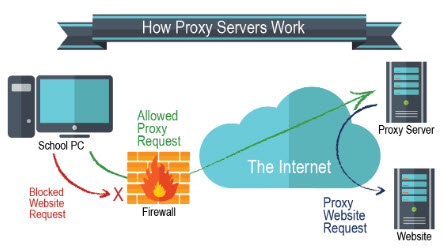
When you use Facebook proxies, your school cannot determine that you are using Facebook.com. It appears that you are using another site (the proxy) when in reality you are happily enjoying Facebook at school.
If your school is savvy however, they also try to keep up with this list of Facebook Proxies and block those with their firewall as well. It’s a cat and mouse game.
Students want to unblock Facebook so they can use it at school. School officials want to prevent any form of Facebook unblock so that their students can focus on studies. But in reality, aren’t you being educated just by reading this article?
In summary, to learn how to get on Facebook at school, you need 2 things. (1) A list of good Facebook Proxies and (2) the knowledge to implement the use of these Facebook Proxies (basically, you just make a few modifications in your browser). Step #2 is not always necessary.
In the next sections, we will look provide you with a list of Facebook Proxies and look at how to implement these proxies within your browser so that you can do a successful Facebook Unblock!
Facebook Proxies
Here, we will present a list of Facebook Proxies that you can use to figure out how to get on Facebook at school. Remember, this is a fairly dynamic list because your school might track Facebook proxies and try to block those as well. So, you will always need an updated list of Facebook Proxies so that you can stay one step ahead.
In many cases, simply accessing the proxy server’s website will allow you to then go directly to facebook. For example, one site that is currently working very well (if your school has not caught it yet) is https://www.proxysite.com/facebook/. With this site, you do not need to adjust any settings in your browser (step #2 above); you simply access Facebook directly from the Facebook Proxy site and this will allow a successful Facebook Unblock.
You can find another vast list of Facebook Proxies by this Google search.
In summary, if you want to do a Facebook Unblock, you need to use Facebook Proxies and there are many to choose from.
Occasionally, you will need to change the Proxy Server that you use because your school may block the Proxy Server as they try to keep you off of Facebook…and you try to stay on it 🙂
How to Use Facebook Proxies
Using a Proxy Server in 2020 is very easy.
When you visit a site such as proxysite.com, they simply provide a box that says “Enter a URL to visit:”. There, you type in http://www.facebook.com.
Then, you’ll want to login to Facebook as you normally would and you’re all set!
How To Get On Facebook At School: Summary
Let’s face it…we all need to access Facebook at school. You’ve got to keep in touch, right?
To do a Facebook Unblock at school, you simply need to use Facebook Proxies. Many lists of Facebook Proxy Links have been provided above.
Occasionally, you may need to know how to use a Proxy Server via it’s IP address and port # by changing the settings in your browser. To understand how to do this, visit the link How to set a proxy server in Chrome, Firefox, Internet Explorer, Microsoft Edge and Opera.
Now that you know how the whole process works, it will be easy to get on Facebook at school!

Get your copy of his latest book entitled Obvious Conclusions, stories of a Midwestern emigrant influenced and corrupted by many years living in San Francisco and abroad. It just received its first outstanding review "...reminiscent of David Sedaris or Augusten Burroughs" on Amazon UK.
- How to use Google Translate [The Ultimate 2021 Guide!] - June 18, 2021
- How To Check Your American Express Gift Card Balance [2021 Updates] - June 18, 2021
- How to Use YouTube TV With a VPN [or abroad] - July 4, 2020
Comments 1
cobb county has all proxy sites